
いつも世界釣りマップを使ってくださり、ありがとうございます!今回のアップデートは、ユーザーのみなさんから寄せられたリクエストをきっかけに生まれました。釣行前のチェックから、大切な釣果の記録、アングラー同士の交流まで。Version 1.9.3〜1.10.0の改善を、マスコットと一緒にご紹介します。
BUILT WITH YOUR VOICE
みんなの声が、
アプリの進化につながったよ!
「こうなったらいいな」を、ひとつずつ。
Version 1.9.3–1.10.0
1.10.0はApp Store・Google Playで配布中です。各ストアでアップデートをご確認ください。
日付も時間も、気になるところへ。
7日間予報から、その日の日別詳細へ。
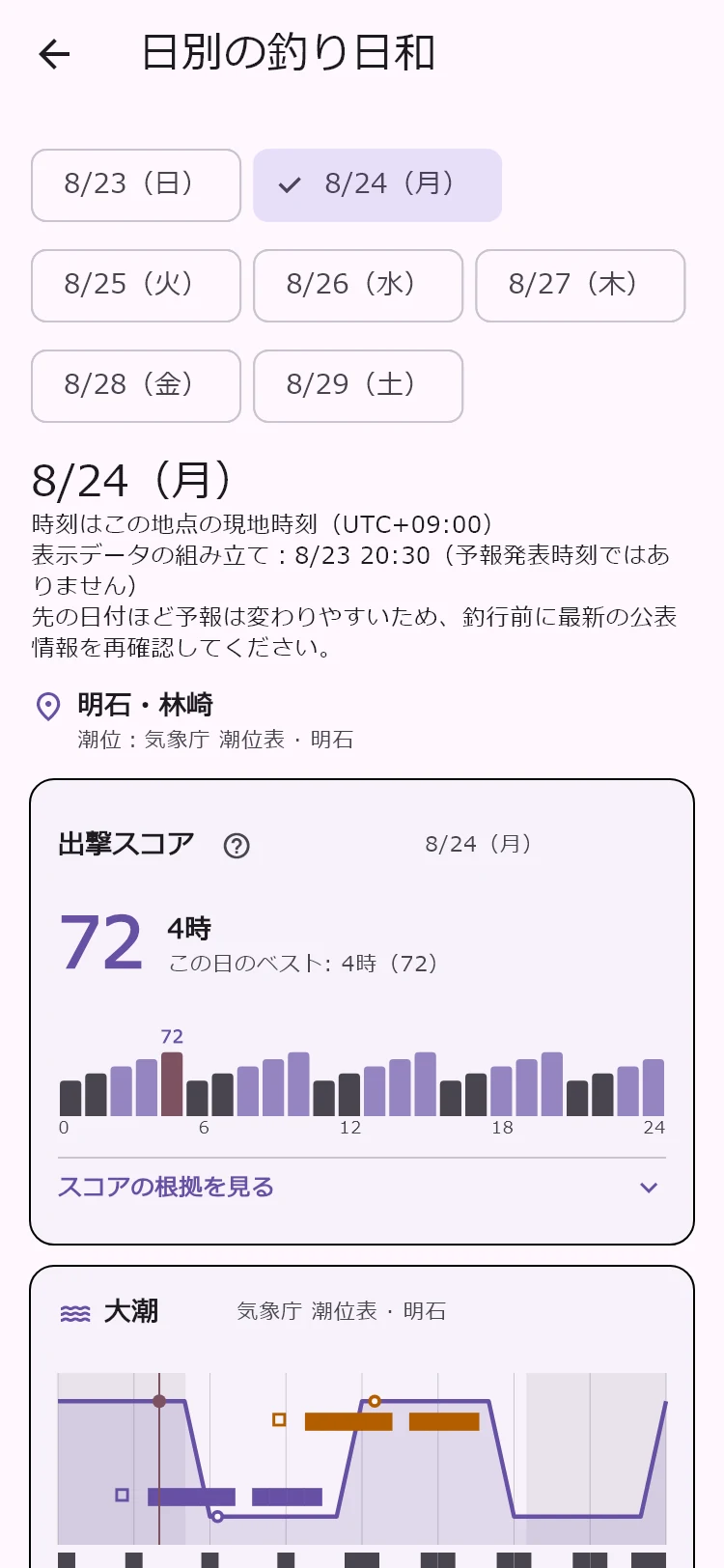
7日間予報の各日から、その日の日別詳細を開けるようになりました。詳細上部で日付を切り替え、時間ごとの情報を見ながら釣行準備ができます。
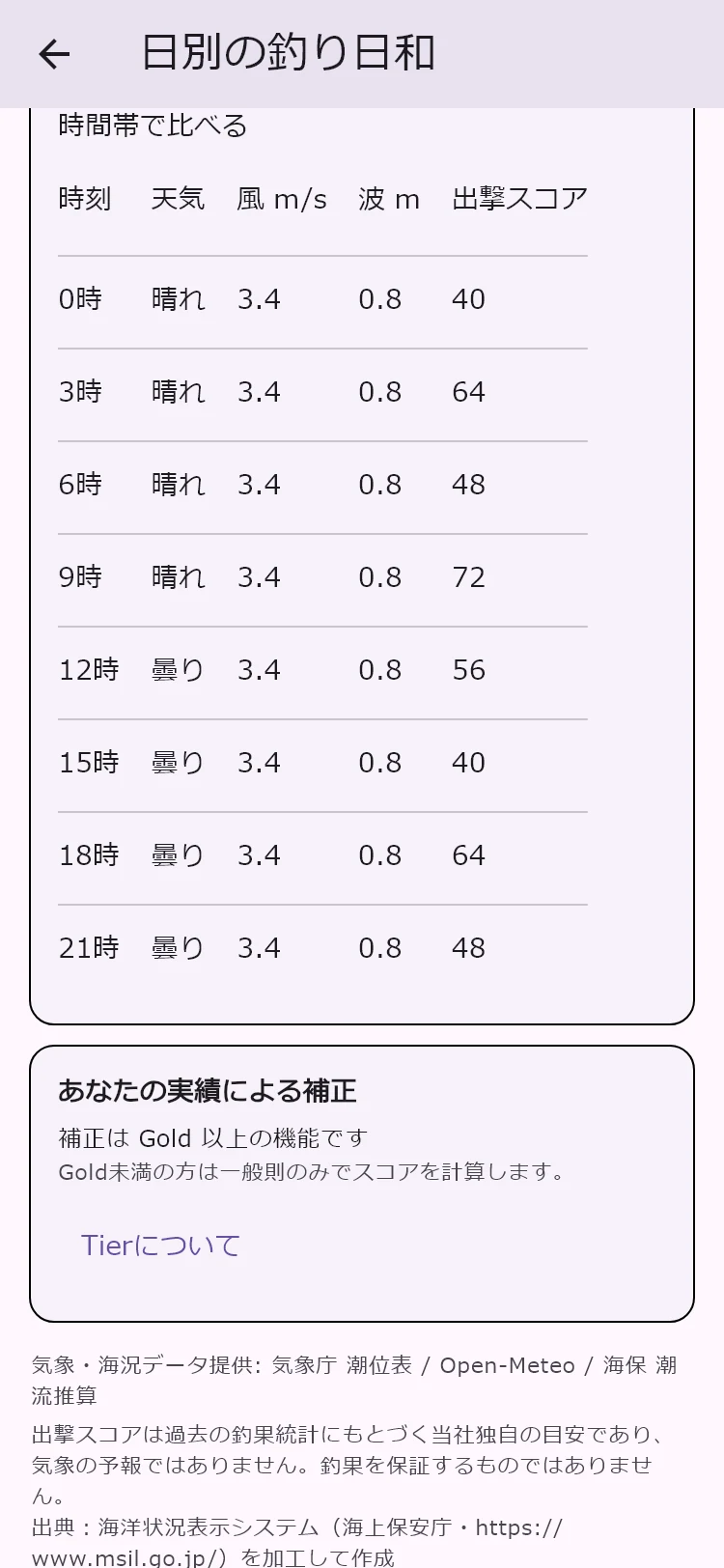
スコアの棒や時間別の表示で時刻を選ぶと、対応する海況や潮位の選択表示も連動。風・波・潮などを、同じ時刻にそろえて確認しやすくなりました。
操作:釣り日和 → 7日間 → 日付のカード → 時刻を選択
ここが変わった!
- 日付を切り替え
週間一覧から日別詳細へ。詳細上部でも日付を選べます。
- 気になる時刻を選択
スコアの棒や時間別表示から、見たい時刻へ。
- 海況・潮位も連動
選択した時刻に対応する情報を確認できます。
閲覧できる項目・期間は会員ランクなどの利用条件やデータ提供状況で異なります。7日分の全詳細が全ユーザーに開放された、という変更ではありません。予報は変わるため、釣行前に最新の公的情報を確認してください。スコアは安全や出航可否を保証しません。
気になる日の、時間ごとの変化まで見てみよう!
次の遠征先も、おうちから準備。
行きたい場所を、地図からスポットに。
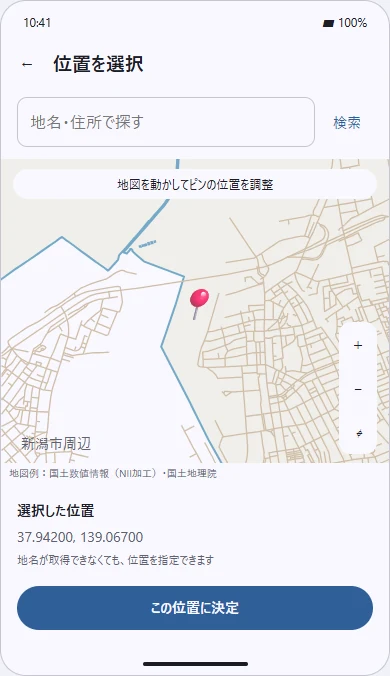
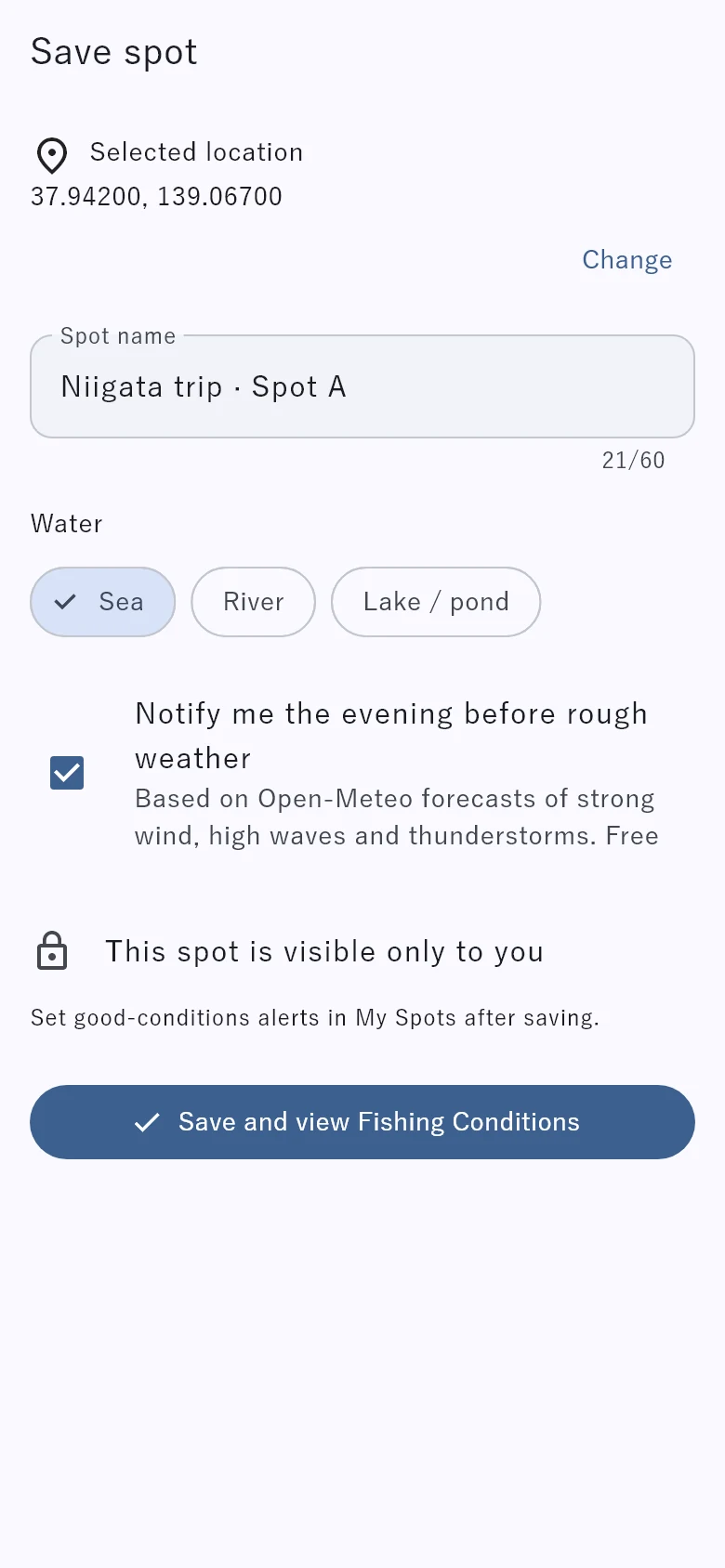
釣り日和の「スポットを追加」で「地図から選ぶ」が使えるようになりました。地名・住所から周辺へ移動し、地図を動かしてピンの位置を調整。名前と水域を入力して保存できます。
現在地にいなくても、次の遠征先や気になる場所を登録できます。従来の「現在地を追加」も引き続き利用でき、保存したスポットは本人だけに表示されます。
操作:釣り日和 → スポットを追加 → 地図から選ぶ → この位置に決定 → 保存
ここが変わった!
- 地名・住所から周辺へ
検索後に地図を見て、位置を調整します。
- ピンの位置を決定
地図を動かし「この位置に決定」。
- 名前・水域を入れて保存
保存後は新しいスポットを選択して釣り日和を表示します。
スポットの登録件数・利用条件は従来どおりです。地点によって取得できない潮汐・海況データがあります。
次に行きたい場所も、おうちから準備できるね!
「保存できた?」を、分かりやすく。
保存・公開の確認・ポイント付与を、分けて案内。
釣果の「保存」「公開に必要な確認」「ポイント付与」の案内を整理しました。「保存済み・公開の確認待ち」など、いまの状態と次にできることを確認しやすくしています。
その釣果のAngler’s Point(AP)とFish Tokenの明細、確認が必要な項目も案内します。保存されていることと、他の人に公開されていることを分けて確認できます。
通信が不安定な場所での端末保存や再送も改善。送信が終わっていない場合は、画面の保存状況と再開案内を確認してください。
操作:記録結果・自分の釣果詳細で、保存状況と案内を確認
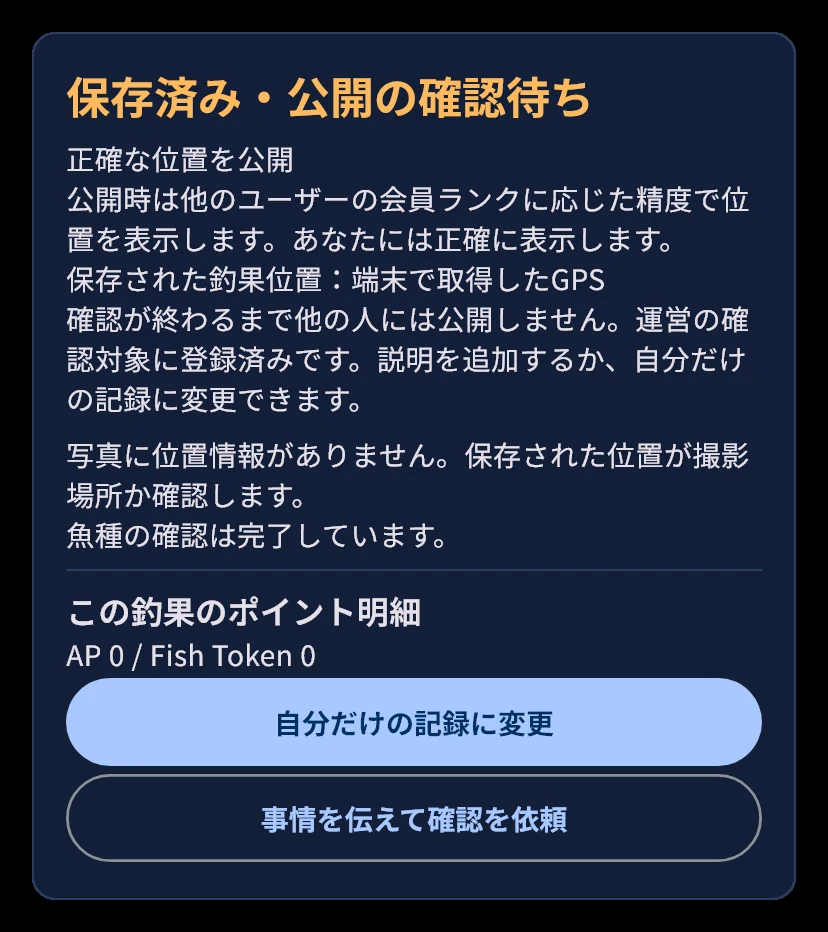
ここが変わった!
- 保存と公開を区別
保存済みでも、公開前の確認が残る場合があります。
- 確認している項目を案内
残っている確認事項と、完了した事項を表示します。
- ポイント明細と次の操作
その釣果のAP・Fish Tokenと、選べる操作を表示します。
端末への保存とサーバーへの送信完了は異なります。通信回復後は画面の送信・再開案内をご確認ください。
保存と公開は別のステップ。いまの状態をチェックしよう!
公開しなくても、思い出は残せる。
確認待ちから「自分だけの記録」へ。
公開の確認待ちの釣果は、写真や記録を残したまま「自分だけの記録」に変更できます。公開せずに、自分の釣りの思い出として残せます。
さらに、自分だけの記録は、地図上の表示位置を変更できるようになりました。公開中の釣果の位置を動かす機能ではありません。
操作:確認待ちの釣果 → 自分だけの記録に変更 → 必要に応じて地図で位置を変更
ここが変わった!
- 写真を残して、自分だけに
対象は公開の確認待ちの記録です。
- 本人用の表示位置を調整
自分だけの記録のマーカーが対象です。
自分だけの記録には釣果報酬のAP・Fish Tokenは付きません。切替時に返還がある場合は確定前に表示されます。位置変更で天候・潮・報酬を再計算することはありません。自分だけの記録を再び公開に変える機能は今回含まれません。
みんなに見せる記録も、自分のための記録も、大切にしよう!
プロフィールから、あの人の釣果へ。
公開釣果の履歴や詳細が、たどりやすく。
アングラーのプロフィールから、公開している釣果の履歴や詳細へ進めるようになりました。最近の公開釣果もプロフィールに表示します。
総記録数と閲覧可能な釣果の件数を分けて表示。公開されている承認済みの釣果だけが閲覧対象なので、非公開の記録が見えるようになる変更ではありません。
自己紹介はアカウントに保存し、公開するかどうかを選べるようになりました。以前この端末に保存した自己紹介は、編集画面の「この端末の旧自己紹介を読み込む」から、内容を確認して取り込めます。自動では公開されません。
操作:アングラーのプロフィール → 釣果履歴を見る → 公開釣果の詳細
表示名
—閲覧可能な釣果
—
公開している釣果
ここが変わった!
- 自己紹介の公開を選べる
アカウントに保存。以前の文章は確認して取り込めます。
- 総数と閲覧可能件数を区別
公開されている承認済み釣果だけが閲覧対象です。
- 履歴から詳細へ
公開釣果の一覧から、それぞれの詳細を見られます。
非公開の釣果が他の人に見える変更ではありません。自己紹介は自動で公開されません。
釣果から、その人らしい釣りの楽しみ方が見えてくるかも!
THANK YOU FOR YOUR FEEDBACK
次の「使いやすい!」も、
一緒につくっていこう。
今回の改善は、日々使ってくださるみなさんの声があったからこそ実現しました。ありがとうございます!
「ここで迷った」「この操作が使いにくい」「こんなことができたらうれしい」。小さな気づきも、次の改善のヒントになります。使った画面や、したかったことを添えて、アプリのメニューにある「報告・お問い合わせ」からぜひお知らせください。
すべてのご要望への対応をお約束することはできませんが、これからもユーザーの声を基に、使いやすい世界釣りマップへ育てていきます。
Thank you for using World Fishing Map! These updates grew out of requests from our users. From planning a trip to saving a special catch and connecting with other anglers, join our mascot for a tour of the improvements in versions 1.9.3–1.10.0.
BUILT WITH YOUR VOICE
Your feedback
helps the app grow!
One helpful change at a time.
Version 1.9.3–1.10.0Version 1.10.0 is available on the App Store and Google Play. Check your store for the update.
Pick a day. Explore it hour by hour.
Open a daily detail view from the seven-day forecast.
Each day in the seven-day forecast now opens its own detail view. Switch dates at the top and explore the hourly information as you prepare for your trip.
Select a time on the score bars or hourly displays, and the corresponding sea-condition and tide selections follow along. It is easier to check wind, waves and tides for the same time.
How to:Fishing Conditions → 7 days → Day card → Select a time
WHAT’S CHANGED
- Switch dates
Open a day from the weekly list, or select another date in the detail view.
- Choose a time
Use the score bars or hourly displays to select the time you want.
- Follow conditions and tides
The corresponding selections update together.
Available items and periods depend on your access level and data availability; this update does not unlock every detail for seven days for everyone. Forecasts change. Check the latest official information before going fishing. Scores do not guarantee safety or determine whether it is safe to sail.
Take a closer look at how your chosen day changes hour by hour!
Plan your next destination from home.
Add a fishing-condition spot by choosing a location on the map.
Choose the map option when adding a spot in Fishing Conditions. Search for a place or address, move the map to position the pin, then enter a name and water type to save it.
You no longer need to be at the location to add a destination you want to check. You can still add your current location, and saved spots are visible only to you.
How to:Fishing Conditions → Add spot → Choose from map → Confirm location → Save
WHAT’S CHANGED
- Find the area
Search for a place or address, then check and adjust the location on the map.
- Position the pin
Move the map and confirm the selected location.
- Name it and save
Enter a name and water type. The saved spot is selected for its forecast.
Existing spot limits and access requirements still apply. Tide and sea-condition data may be unavailable at some locations.
Get ready for your next destination before you leave home!
Know what has been saved, and what comes next.
Clearer guidance for saving, sharing review and points.
We have separated guidance about saving a catch, the checks needed before sharing it, and awarded points. Messages such as “Saved · awaiting sharing review” make the current status and available next steps clearer.
You can check that catch’s Angler’s Point (AP) and Fish Token details, along with any remaining checks. A saved catch and a catch shared with others are clearly distinguished.
On-device saving and upload recovery with weak connectivity have also improved. If an upload is unfinished, check the saving status and follow the on-screen instructions to resume.
How to:Check the result screen or your catch details for the status and next steps
WHAT’S CHANGED
- Separate saving from sharing
A saved catch may still need checks before it can be shared.
- See what is being checked
The display identifies remaining and completed checks.
- Check points and next steps
View the catch’s AP and Fish Token details and available actions.
Saving on your device is different from completing an upload to the server. When connectivity returns, follow the upload or resume instructions shown on screen.
Saving and sharing are separate steps. Check the current status!
Keep the memory, even if you don’t share it.
Keep a catch private while it is awaiting sharing review.
A catch awaiting sharing review can now be changed to a private record while keeping its photo and record. Keep the memory for yourself without sharing it with other users.
You can also move the marker displayed on your own map for a private record. This does not let you move the location of a publicly shared catch.
How to:Pending catch → Keep as a private record → Adjust its map position if needed
Move the map to select a location
Location editing illustrationWHAT’S CHANGED
- Keep the photo and record
This option applies to catches awaiting sharing review.
- Adjust your private marker
Location editing applies only to your own private records.
Private records do not receive catch-reward AP or Fish Token. Any points to be returned when switching are shown before confirmation. Moving a marker does not recalculate weather, tides or rewards. Changing a private record back to public is not part of this update.
Shared memories and private memories both deserve a place!
Explore an angler’s catches from their profile.
A clearer path to public catch history and details.
You can now open an angler’s public catch history and catch details from their profile. Their recent public catches also appear on the profile.
Total records and viewable catches are shown separately. Only approved, publicly shared catches can be viewed; this update does not reveal private records.
Your biography is saved to your account, and you choose whether to make it public. If an older biography is stored on your device, use the import option in the editor to review and bring it in. It is not published automatically.
How to:Angler profile → View catch history → Public catch details
Display name
—Viewable catches
—
Public catches
WHAT’S CHANGED
- Choose whether to share your bio
Save it to your account. Review an older local biography before importing.
- Separate total and viewable counts
Only approved, public catches can be viewed.
- Open history and details
Browse public catches and open their details.
Private catches remain private. Your biography is not published automatically.
Discover how other anglers enjoy their fishing!
THANK YOU FOR YOUR FEEDBACK
Let’s make the next
helpful change together.
These improvements happened because of feedback from the people who use the app. Thank you!
Got stuck somewhere? Found an awkward step? Have an idea that would help? Even a small observation can inspire an improvement. Tell us which screen you used and what you wanted to do through “Report / Contact” in the app menu.
We cannot promise to implement every request, but we will keep improving World Fishing Map with your feedback.